Introduction
How to Create a Responsive Website Without Coding is one of the most searched questions among small business owners and startups in 2026. If you want a mobile-friendly, professional website without learning programming, this complete guide will walk you through the exact steps, tools, and best practices to build a responsive website easily.
In today’s digital world, having a responsive website is essential for business growth. Whether your audience visits from mobile, tablet, or desktop, your website must adjust perfectly to every screen size.

What is a Responsive Website?
A responsive website automatically adjusts its layout, images, and content according to the screen size of the device.
This means:
- Better user experience
- Higher engagement
- Improved SEO rankings
- More conversions
Google prioritizes mobile-friendly websites. If your site is not responsive, you may lose traffic and potential customers.
Why Responsive Design is Important for Businesses
For small and medium businesses, responsive design directly impacts:
- Brand credibility
- Customer trust
- Sales performance
- Search engine visibility
If your website loads slowly or looks broken on mobile, users will leave instantly.
That’s why businesses invest in professional Website Designing services to ensure performance, usability, and growth.
Best Platforms to Create a Responsive Website Without Coding
Here are the best no-code platforms:
1. WordPress (With Page Builders)
- Flexible
- SEO friendly
- Thousands of responsive themes
- Ideal for business websites
2. Shopify (For eCommerce)
- Perfect for online stores
- Built-in responsive themes
- Easy product management
If you’re planning to sell online, you may also explore professional eCommerce Development services for advanced features.
3. Wix
- Drag-and-drop builder
- Beginner friendly
- Quick setup
4. Webflow
- Advanced customization
- Modern responsive control
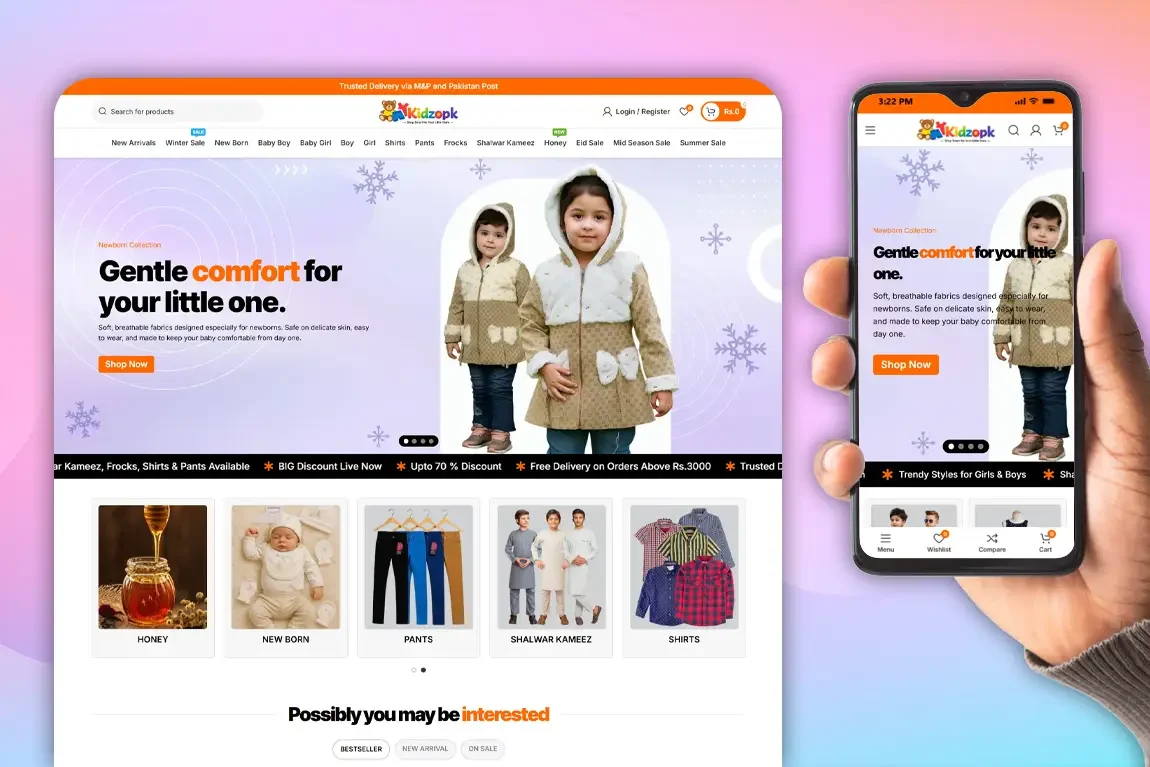
Step-by-Step: How to Create a Responsive Website Without Coding
Step 1: Choose a Reliable Domain & Hosting
Your website performance depends on hosting.
Choose fast, secure hosting with 99.9% uptime to ensure your website runs smoothly without downtime or speed issues.
Reliable hosting improves:
- Website speed
- Security protection
- Search engine rankings
- User experience
To avoid technical complications, you can explore our professional Domain & Hosting solutions designed for small and medium businesses.
“Special Offer: If you choose Technology Point for your website designing project, we provide 1 year free domain and hosting – helping you launch your business online without extra initial costs.”
Step 2: Select a Responsive Theme
Pick a theme that:
- Is mobile-friendly
- Loads fast
- Has a clean design
- Is SEO optimized
Always preview theme demos on mobile view.
Step 3: Customize Using Drag-and-Drop Builder
Use page builders to:
- Add sections
- Insert images
- Add buttons
- Create contact forms
Keep the layout clean and simple.
Step 4: Optimize for Mobile
Before publishing:
- Test on different devices
- Check font sizes
- Optimize images
- Improve loading speed
You can also improve visibility with professional SEO Services.
Step 5: Test & Publish
Use tools like:
- Google Mobile-Friendly Test
- PageSpeed Insights
Fix any performance issues before going live.
Common Mistakes to Avoid
- Choosing cheap hosting
- Using too many plugins
- Ignoring mobile layout
- Not optimizing for SEO
- Poor navigation structure
These mistakes can hurt your rankings and business growth.

When Should You Hire a Professional Web Design Company?
No-code tools are great for beginners. However, you should hire professionals if:
- You need custom functionality
- You want a scalable architecture
- You require advanced security
- You want better conversion optimization
A professional web development team ensures your website is optimized for speed, SEO, and long-term business growth.
If you’re serious about building a high-performance website, you can request a consultation through the Get A Quote page or reach out via the Contact Us section.
Benefits of Hiring Professionals Instead of DIY Builders
- Custom UI/UX design
- Advanced integrations
- Better performance
- Higher search rankings
- Professional branding
Your website is your digital storefront – it should reflect quality.
Frequently Asked Questions (FAQs)
1. Can I create a responsive website for free?
Yes, some platforms offer free plans. However, free versions often include ads and limited features.
2. Do I need coding skills to build a responsive website?
No, drag-and-drop builders allow you to create websites without coding knowledge.
3. How long does it take to build a responsive website?
Using no-code tools, you can create a basic website in a few days. A professional custom website may take 2–4 weeks.
4. Is WordPress better than Wix?
WordPress offers more flexibility and scalability, while Wix is simpler for beginners.
5. Why is responsive design important for SEO?
Google ranks mobile-friendly websites higher. A responsive design improves user experience and reduces bounce rate.
Final Thoughts
Creating a responsive website without coding is absolutely possible using modern tools. However, for businesses that want long-term growth, professional support makes a big difference.
Whether you need a simple business website or a complete digital solution, expert guidance ensures your investment delivers real results.